Technique

Posted on: Jan 30, 2025
About 1 year ago
1425
193
5
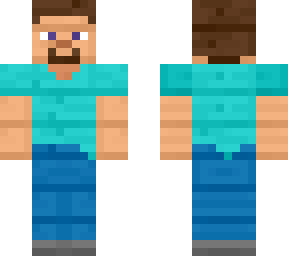
Step 1. Download any Classic/Steve arms Minecraft skin via Skindex "embed code" frontal and backside display image, long pressing the image and save to local device gallery application.

Step 2. Access to website "http://mcskins.top./" and select "Image to Skin" option.

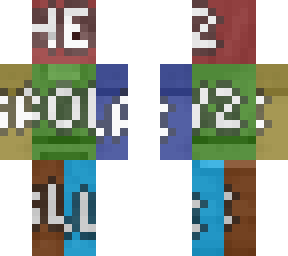
Step 3. Select the previously downloaded display image, and choose a specific pixelation resolution to sizes 6464 or 128128. 128128 size will double the size of each pixel dots from 1 pixel to become 4 pixels. Select "smoothing" optionally.

Step 4. Align the frontal and backside of whole body perfectly to the frames of frontal and backside (alternative back, optional), without exposing to reveal white/transparent parts of image.

Note: The whole skin will stretch to cover the rest of the skin divided from frontal and backside. For all head parts will take approximately 84 32 pixels for half, for limbs parts shoulders and palms will take approximately 24 8 pixels, the rest of all the longer limb parts will 212 24 pixels, the torso will take approximately 212 24 pixels all sideways and 28 16 all top & bottom.

Steve is used as an example skin, all copyrights reserved to 2025 Mojang AB.
Show More
Show Less

advertisement

Upload Download

Embed codes


Similar skins

Comments: 3

Ok simpleton.
The equation symbol of multiply does not appear on Skindex, think with logic and do the math yourselves.
Nerd
The equation symbol of multiply does not appear on Skindex, think with logic and do the math yourselves.