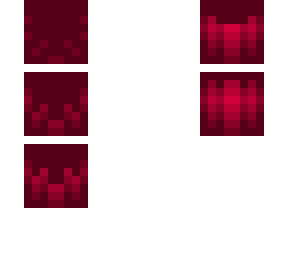
Tutorial pt. 4 (hair)

Posted on: Nov 26, 2022
About 3 years ago
60
23
0
Show more for step by step

1. Using the lighten tool, use the hair color and lighten it by one. Use that new color and look at where you put it on the hair. Then do it yourself.

2. Using the lighten tool, use the hair color and lighten it by 2. (Repeat from above)

3. Using the lighten tool, use the hair color and lighten it by 3. (Repeat from above)

4. Using the lighten tool, use the hair color and lighten it by 4. (Repeat from above)

5. Here is where it gets confusing. You start to darken the lighter colors. Grab the original hair color and lighten it by 3. Put it on top of the thinner, lighter shading on both sides. Then grab the og hair color. Lighten it by 5. Put it on top of the thicker, lighter shading (the one in the middle)

Go in the comments for more info! I’m out of room lol (sort by oldest) if u have any questions, feel free to let me know! If you use this, tag it AngelStartutorials and/or credit me.
Show More
Show Less

advertisement

Upload Download

Embed codes


Similar skins

Comments: 2

7. The blue is where you put the outer layer, using the colors underneath the blue
6. You lighten the hair color by 2. Put it on top of the thinner, lighter shading. Then also put that shading on top of the one right next to that on the left. Repeat that on the other side, except the second time. You put it on the right so it is always the part closest to the middle. Then for the center, you grab the og hair color, and lighten it by 4 and 3. In the center, you should be able to figure out where goes where.