Skin Map Guide

Posted on: May 12, 2021
About 5 years ago
173
82
0
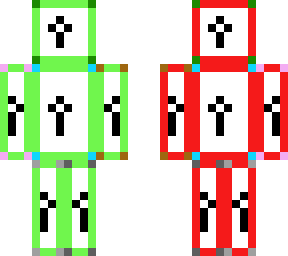
This Minecraft skin is a guide for helping those who want to create their own skin using the skin map and an art software like Photoshop or Paint. It can also be used as a guide to create HD skins, if you know how! Make sure you look at this description when using my guide, as I include what all the colors and lines mean. If you just do that, I am sure you will find this to be pretty simple! Enjoy!

Borders:
Light green = front
Red = back
Blue = right side
Orange = left side
Yellow = top
Purple = bottom

Corner Dots:
Dark green = head
Light blue = torso
Pink = right arm
Brown = left arm
Light grey = right leg
Dark grey = left leg

Black arrows/lines:
Horizontal view = which way is up
Vertical view (top and bottom only) = which way is front
Areas with only a 2x2 pixel length have a single black line on the side that indicates which way is front
Show More
Show Less

advertisement

Upload Download

Embed codes


Similar skins

Comments: 0