


I NEED TIPS

Posted on: Jul 06, 2017
About 8 years ago
4
509
25
0
Show More
Show Less

Similar skins
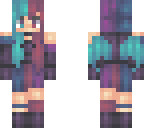
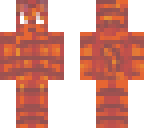
MangleFox70
Thanks so much, I'll take that advice for sure! <3

EmmasBases
One more thing. I'm sorry, I feel bad for like constructive criticism I'm about to give, but I just wanted to give you advice. (this is all my opinion btw, and I looove your skins nonetheless). I'll be using Skin 1, meaning ( https://www.minecraftskins.com/skin/11172667/bunny-slippers---requested-skin/) and Skin 2, meaning ( https://www.minecraftskins.com/skin/11182541/ombre-flames---reshade-contest-entry/) In my opinion, for Skin 2, the brightness looks REALLY good on the scarf and shoes. Like AMAZING. That's because they are small parts of the skin, and not the whole thing, so it's like an accent. However, with Skin 1, the whole skin is super bright. Maybe try making only parts of it bright, like with Skin 2. In the shirt, the difference between the darkest pink color (darkest shade) and the darkest purple (2nd darkest shade) should be a little less. Like I was telling you before, try to think of hue-shifting like stairs. (sorry if I sounded like I was being rude, I was just trying to help you with shininess and skinning in general. This is all my opinion, and you don't have to listen to me at all. Your skins are amazing if you listen to me or not!) ~Em <33
EmmasBases
Ah, Skindex is fine. I use it sometimes, but it isn't my favorite xD I usually use www.minecraftskins.net/skineditor because you can create palettes, and to fill in areas, all you have to di is double-click.You can also make it to where only a certain part is overlay on the skin. Keep in mind that if you download the skin, only the parts that are being shown will be downloaded, so make sure to put thw whole skin back, including overlay, before you download it. Also, I'm not sure if anyone else has this problem on the editor I showed you, but sometimes (for me) the skin starts undoing more than one time when you click the undo button. If this happens, just constantly click the redo button until it stops. Anyway, about the shininess. If you are using lighten and darken tools, I recommend not using those. They lighten/darken into different colors each time, so your skin could have a lot of different colors without you noticing it, like here https://www.minecraftskins.com/skin/8314700/my-first-base/ Also, try not to have such extreme color changes in your shading. When hue-shifting, try to do it in a less intense way. Think of the last color in hue-shifting as the top step of a staircase. They have a lot of small steps to get to the top, not like 3 huge ones. Hope I helped at all, and if I didn't make any sense, I'm osrry ;:;
MangleFox70
Thanks :)
MangleFox70
The worst editor of all, the Skindex's xD
BooMinion
you could go to @Pixelbeanie's channel and skins :3

EmmaMinecraft
I love your style! But if you don't like the shininess, I can help you with that. First I need to know, what editor do you use to make skins?
Downloading in 10
Advertisement


Give a thumbs up to show support for the creator. It means a lot!
Comments: 7